Guide
VAT-free ELTA exports and CN23
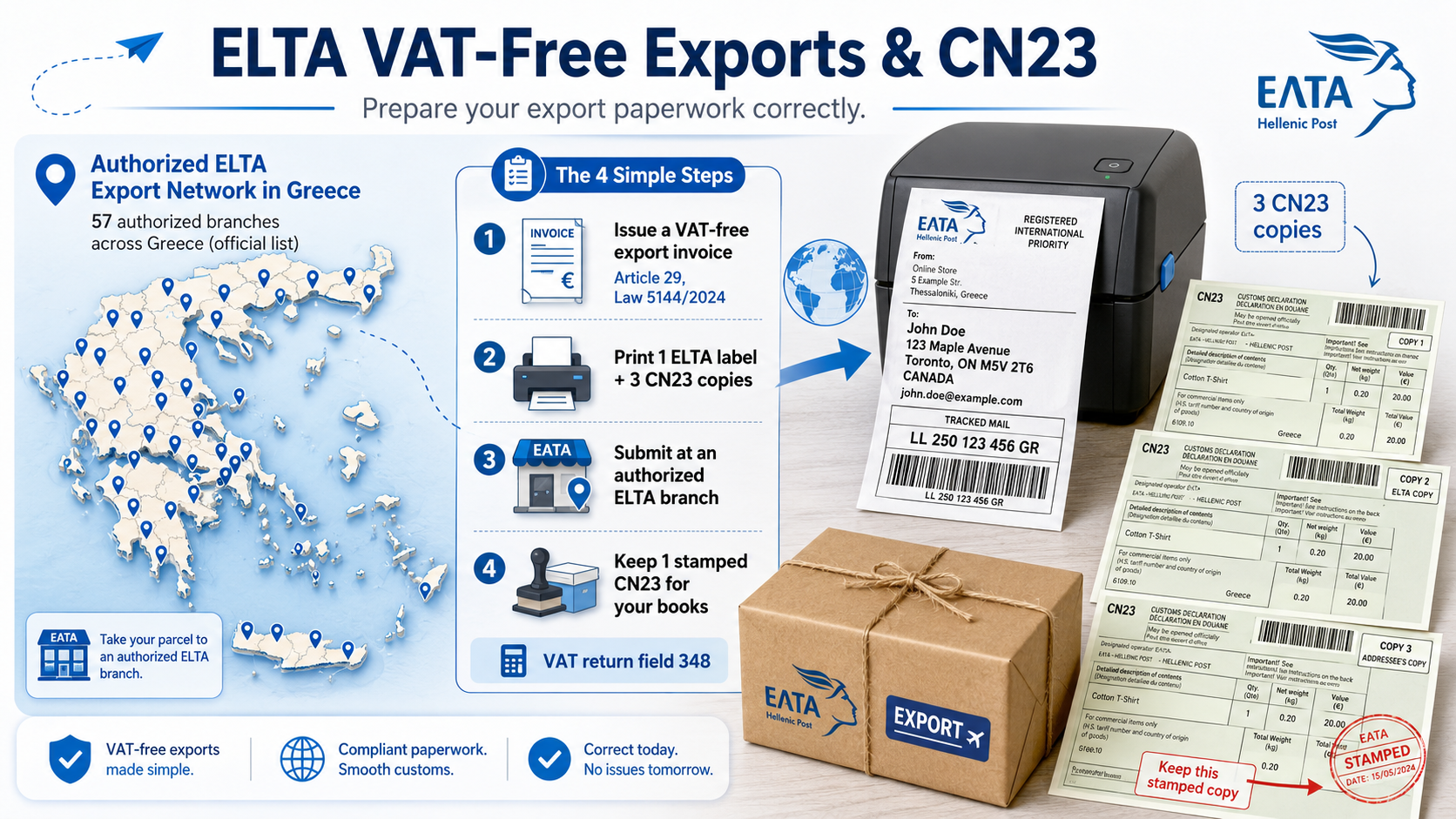
Do you sell via an e-shop, Etsy, eBay, or another marketplace and ship orders from Greece to countries outside the European Union?
For goods worth up to €1,000 per shipment, ELTA offers a simplified export process. Instead of a full electronic export declaration, export can be documented by correctly completing and stamping the CN23 customs declaration at a specially authorized ELTA branch.
The process is relatively straightforward, but three points are critical:
- The tax document must be issued without Greek VAT.
- The shipment must be handed in at an ELTA branch authorized for exports.
- You must get a stamped CN23 copy back and keep it in your records.
For goods up to €1,000, the stamped CN23 is the main proof of exit for VAT exemption.
1. How to issue an invoice or receipt without VAT
Sales of goods exported from Greece to a non-EU country can be exempt from Greek VAT, provided the export process is followed and proven.
On the sales invoice you should use an exemption indication such as:
ΑΠΑΛΛΑΓΗ ΑΠΟ Φ.Π.Α. – ΑΡΘΡΟ 29 Ν. 5144/2024 – ΚΩΔΙΚΑΣ ΦΟΡΟΥ ΠΡΟΣΤΙΘΕΜΕΝΗΣ ΑΞΙΑΣ
You may optionally add an English explanation:
VAT exempt export outside the EU – Article 29, Law 5144/2024.
AADE’s official guidance also uses:
ΑΠΑΛΛΑΓΗ Φ.Π.Α., ΛΟΓΩ ΕΞΑΓΩΓΗΣ – ΑΡΘΡΟ 29 Ν. 5144/2024
Article 29 of the new VAT Code replaces the older reference to Article 24 of Law 2859/2000, which still appears in older articles, guides, and accounting software.
The document must normally show:
- seller details,
- customer details and destination country,
- document number and date,
- product description and quantity,
- net value and currency,
- the VAT exemption indication above.
For retail sales to a private individual outside the EU, a retail receipt may be issued, but the customer details must still be clear from it. The document must also be linkable to the specific shipment and the matching CN23.
VAT return: code 348
Export values are reported in the VAT return under:
Code 348 — Exports and exemptions for ships and aircraft
Although the field name also mentions ships and aircraft, this is where the value of exports to third countries is declared.
The transaction must likewise be transmitted to myDATA with the appropriate export characterization, not merely as a general sale at a 0% VAT rate.
2. Not every ELTA branch can stamp an export
First, enable exports on your Web Labeling account
Before using Web Labeling for exports and obtaining the stamped CN23 (Διασάφηση Εξαγωγής), you must have the export option enabled on your ELTA Web Labeling account. You can usually request activation at any ELTA post office. Arrange this before your first export shipment.
Requesting account activation and handing in an export shipment are separate steps: the shipment must still go to an authorized export branch.
Hand in the shipment at an authorized branch
Do not hand the shipment in at just any ELTA branch.
For the CN23 to serve as proof of export and VAT exemption, it must be lodged at an ELTA branch or agency on the official list of offices that accept commercial exports to third countries.
The official, continuously updated list is published by AADE:
The September 2026 edition includes 58 branches, with Karditsa added from 14 September 2026.
Map of authorized ELTA branches
The interactive map below shows all 58 branches in this AADE catalogue. Locations were checked against ELTA’s branch locator and map sources. Where ELTA lists a different current address, the popup also shows the catalogue address. Paros and Lefkada need location confirmation because published sources disagree; their orange circles include branch phone numbers.
Export branches from the AADE catalogue, with locations checked against the ELTA locator and map sources. Orange circles indicate locations that need confirmation: call the branch before visiting. Always check the latest official list. latest official list .
Map locations reviewed: 1 November 2026 · AADE catalogue effective: 14 September 2026
The map is provided for convenience. Because the catalogue can change, always check the latest official AADE list before visiting a branch.
Create ELTA Web Labels automatically from your e-shop
With pane.gr, you can connect your Etsy (using our extension), eBay, WooCommerce, Shopify, and other stores to your own ELTA Web Labeling account.
Orders sync automatically, and recipient, product, and weight details move onto the label without manual copy-paste. You can create and download ELTA labels and the matching customs forms in bulk, reducing data-entry time and address errors. For USA shipments, Zonos duty payment is also supported.
Postal charges are still billed directly by ELTA to your account. pane.gr automates Web Label creation; it does not replace your duty to present the required CN23 copies and collect your stamped copy.
3. What to bring to the branch
For a typical commercial shipment via ELTA Web Labeling, prepare:
- the closed, properly packed parcel,
- the shipping label with the barcode number,
- the sales invoice or receipt,
- three copies of the CN23, or four if your branch requires them.
The three copies are used as follows:
- One copy travels with the parcel and is affixed to the packaging.
- One copy is kept by the ELTA branch for its records and to update the competent customs office.
- One copy is returned to you, stamped, for your accounting and tax files.
ELTA preparation instructions ask for CN23 in three copies, while detailed customs guidance provides that the copies must bear the branch date stamp.
Some ELTA offices ask for four copies instead of three. Confirm the number with the branch where you will hand in the shipment, or bring a fourth copy to avoid having to print another one there.
Do not leave without the stamped CN23
Ask the clerk to:
- link the CN23 to the shipment barcode,
- stamp the copies with the chronological stamp,
- return your copy to you.
The copy you keep is confirmation that the item was accepted by an authorized branch for export. A mere postage receipt or a tracking screenshot does not replace the stamped CN23 as the main tax evidence.
Pro tip: print three or four CN23 copies with one Windows print command
The label produced by Web Labeling usually includes:
- the shipping label on the first page,
- the CN23 on the second page.
When printing from Windows to a label printer:
- Open the print dialog.
- Choose Custom Range (or the equivalent page-range option).
- In the pages field enter:
1,2,2,2
This prints:
- the first page once (the shipping label),
- the second page three times (three CN23 copies).
If your branch requires four CN23 copies, enter 1,2,2,2,2 instead: the shipping label prints once and the CN23 four times.
You do not need to open and print the file a second or third time.
4. What to fill in correctly on the CN23
CN23 information must match the tax document and the real order.
For tax and customs purposes it is especially important to show:
- the sender/exporter name,
- the exporter’s ΑΦΜ (VAT number),
- the invoice or receipt number,
- the total value,
- an accurate product description,
- quantity,
- weight,
- country of origin,
- the HS code for each product category,
- the shipment category, usually Sale of goods,
- the postal shipment barcode number,
- if your product is subject to CPSC rules for the USA, the corresponding fields.
Official customs guidance lists as mandatory tax fields the exporter name, HS code, ΑΦΜ, invoice number, and value.
Avoid generic descriptions such as:
- “gift”,
- “sample”,
- “parts”,
- “accessories”,
- “electronics”.
Use a specific description, for example:
LED electronic projection device for household use
and not merely:
Electronic item
The declared value must not be artificially reduced. It must match the real selling price and the tax document.
5. CN22 or CN23 — what is the difference?
CN22 and CN23 are customs declarations that accompany postal items to non-EU countries, but they do not serve exactly the same purpose.
CN22
CN22 is the smaller, simpler customs declaration. It is mainly used for letter-post items up to 2 kg and is placed on the item.
CN23
CN23 is a more detailed customs declaration and includes more information about the sender, recipient, contents, value, and HS codes.
For letter-post items up to 2 kg, CN22 may accompany the item. However, when a professional exporter needs to document exemption from Greek VAT, a CN23 must also be completed.
In plain terms:
CN22 may be enough for a small postal item to travel, but it does not replace the stamped CN23 you need to document VAT exemption.
For parcels and for letter-post items over 2 kg, CN23 is used.
6. When CN23 alone is not enough
The simplified CN23 process without a full export declaration applies to goods worth up to €1,000 per postal shipment.
CN23 alone is not enough when:
- the shipment value exceeds €1,000,
- the goods are subject to Excise Duty,
- the goods are subject to prohibitions or restrictions,
- trade-policy measures apply,
- special licences or certificates are required,
- it is a temporary export intended for later re-import, such as repair or exhibition.
In those cases a normal export customs declaration is required at the competent customs office. To submit it you usually need:
- an EORI number,
- a customs representative or customs broker,
- an electronic export declaration,
- an MRN,
- completion of export and issuance of the IE599 message.
IE599 then becomes the main proof of exit for VAT exemption, instead of CN23 alone.
Do companies need EORI when exporting with CN23?
Yes. A business established in Greece that exports goods needs EORI registration. The simplified postal process for eligible shipments up to €1,000 removes the need for a full electronic export declaration; it does not remove the business’s EORI registration obligation.
The European Commission states that economic operators established in the EU customs territory need EORI. This obligation is separate from the details requested on the CN23, including the exporter’s ΑΦΜ (VAT number).
Register before starting commercial exports. You use the same EORI for subsequent shipments; you do not apply for a new number for each CN23. Occasional private, non-business shipments follow different registration rules.
7. What to keep in your records
For every non-EU order, create a complete electronic or paper file that includes:
- the invoice or receipt without VAT,
- the stamped CN23 copy,
- the label and tracking number,
- the postage payment receipt,
- the order from the e-shop or marketplace,
- the customer payment proof,
- the final tracking or delivery status,
- any credit note or refund.
The tax document, CN23, payment, and tracking must be clearly linkable to each other.
From order to label, without manual retyping
If you often issue ELTA labels for international orders, pane.gr’s eshop labeling service gathers your orders in one screen and creates ready ELTA Web Labels in a few clicks.
That way you can use ELTA where it makes sense, without retyping every address and product into Web Labeling.
See how automatic ELTA Web Labels work →
Quick checklist before you go to ELTA
- Your business has an EORI number.
- The export option is enabled on your ELTA Web Labeling account.
- The destination country is outside the EU.
- The shipment value does not exceed €1,000.
- The products are not subject to special restrictions.
- The document was issued without VAT with reference to Article 29.
- Details and value on the CN23 match the document.
- You have printed the label and three or four CN23 copies, as required by your branch.
- The branch is on the official AADE catalogue.
- You will collect a stamped CN23 copy.
- The export will be reported under VAT code 348.
Important disclaimer
This article is provided solely for general information and is not tax, accounting, customs, or legal advice.
pane.gr is not an accounting, tax, or customs brokerage firm and does not guarantee that the process described covers every product, transaction, destination country, or special case.
Tax and customs rules, forms, and the list of authorized ELTA branches can change. Before applying any process, confirm the requirements with your accountant or tax advisor and, where needed, with AADE, the competent customs office, or ELTA.
If this article differs from an official instruction, the official guidance of the competent authority always prevails.